Overview
Custom widgets allow you to create interactive UI elements within existing game interfaces. You can add new buttons, icons, or other visual elements to any widget group and handle user interaction through click and menu events.
Result
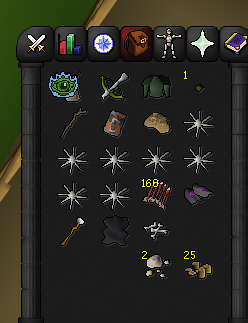
Creating a Widget
To create a custom widget, we're going to attach underneath an existing one, for example within the Inventory.
var parent = Game.info.getWidget(149, 0); // Inventory tab
var widget = parent.createChild(-1, 5); // -1 = append, 5 = widget type (graphic)
Configuring Appearance
| Method | Description |
|---|---|
setSpriteId(id) |
Sets the sprite/icon to display |
setOriginalX(x) |
X position relative to parent |
setOriginalY(y) |
Y position relative to parent |
setOriginalWidth(w) |
Widget width in pixels |
setOriginalHeight(h) |
Widget height in pixels |
setName(name) |
Display name (used in menu targets) |
setAction(index, text) |
Sets a right-click menu action |
setHasListener(bool) |
Enables interaction events |
revalidate() |
Applies layout changes — call after setting position/size |
Handling Clicks
Use OnMenuOptionClicked to respond when a user clicks your widget's menu action. Match on getMenuTarget() (the widget name) and getMenuOption() (the action text).
Note: Menu option text may include colour tags like <col=ff0000>...</col>.
var lastClickTime = 0;
function OnMenuOptionClicked(event) {
var now = Date.now();
if (now - lastClickTime < 250) return; // debounce
lastClickTime = now;
if (event.getMenuTarget() == "Rigour" && event.getMenuOption() == "<col=ff0000>Activate</col>") {
PlayerHelper.activatePrayer(Prayer.RIGOUR);
}
}
A short debounce (e.g. 250ms) is recommended to prevent duplicate click events.
Adding Right-Click Menu Entries
Use OnMenuEntryAdded to inject custom menu entries when the mouse hovers over your widget. You need to manually check if the mouse is within the widget bounds.
function OnMenuEntryAdded(event) {
if (!newPrayer || newPrayer.isHidden()) return;
var mouseX = Client.getMouseX();
var mouseY = Client.getMouseY();
if (isMouseOverWidget(newPrayer, mouseX, mouseY)) {
var groupId = newPrayer.getId() >>> 16;
var childId = newPrayer.getId() & 0xFFFF;
var entry = MenuEntry.create("Activate", "Rigour", 57, childId, groupId, 0, false);
Utility.insertRightClickMenu(entry, 255, 0, 0, 0);
}
}
The widget ID encodes both group and child IDs — extract them with bit shifting:
- Group ID:
widget.getId() >>> 16 - Child ID:
widget.getId() & 0xFFFF
Mouse Hit Detection
A helper to check if the mouse is within a widget's bounds:
function isMouseOverWidget(widget, mouseX, mouseY) {
var widgetX = widget.getCanvasLocation().getX();
var widgetY = widget.getCanvasLocation().getY();
var width = widget.getWidth();
var height = widget.getHeight();
return mouseX >= widgetX &&
mouseX < widgetX + width &&
mouseY >= widgetY &&
mouseY < widgetY + height;
}
Full Example
A complete example that adds a custom Rigour prayer button to the prayer tab:
var runOnce = false;
var newPrayer;
function OnGameTick() {
totalTicksRunning++;
if (!runOnce) {
var inv = Game.info.getWidget(149, 0);
newPrayer = inv.createChild(-1, 5);
newPrayer.setSpriteId(1420);
newPrayer.setOriginalX(5);
newPrayer.setOriginalY(5);
newPrayer.setOriginalWidth(32);
newPrayer.setOriginalHeight(32);
newPrayer.revalidate();
newPrayer.setAction(0, "Activate");
newPrayer.setName("Rigour");
newPrayer.setHasListener(true);
runOnce = true;
}
}
var lastClickTime = 0;
function OnMenuOptionClicked(event) {
var now = Date.now();
if (now - lastClickTime < 250) return;
lastClickTime = now;
if (event.getMenuTarget() == "Rigour" && event.getMenuOption() == "<col=ff0000>Activate</col>") {
Utility.print("activate!!!");
PlayerHelper.activatePrayer(Prayer.RIGOUR);
}
}
function OnMenuEntryAdded(event) {
if (!newPrayer || newPrayer.isHidden()) return;
var mouseX = Client.getMouseX();
var mouseY = Client.getMouseY();
if (isMouseOverWidget(newPrayer, mouseX, mouseY)) {
var groupId = newPrayer.getId() >>> 16;
var childId = newPrayer.getId() & 0xFFFF;
var entry = MenuEntry.create("Activate", "Rigour", 57, childId, groupId, 0, false);
Utility.insertRightClickMenu(entry, 255, 0, 0, 0);
}
}
function isMouseOverWidget(widget, mouseX, mouseY) {
var widgetX = widget.getCanvasLocation().getX();
var widgetY = widget.getCanvasLocation().getY();
var width = widget.getWidth();
var height = widget.getHeight();
return mouseX >= widgetX &&
mouseX < widgetX + width &&
mouseY >= widgetY &&
mouseY < widgetY + height;
}